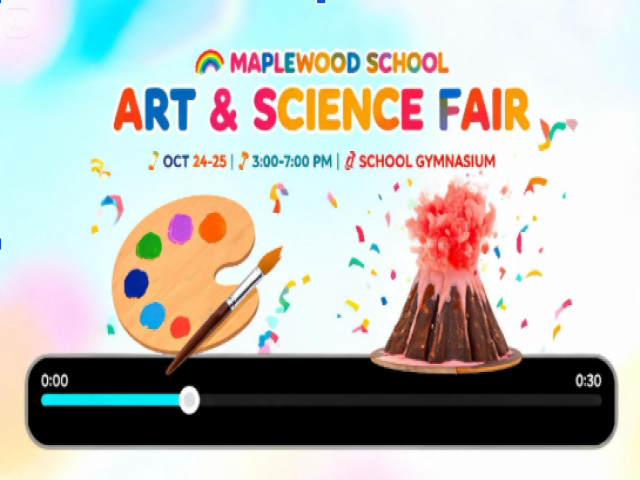
Most families find out about school events the same way: a crumpled flyer at the bottom of a backpack, found three days too late. A short, bright reel on the school's social page or parent group has a much better chance of being seen. It plays on a phone, it takes seconds to watch, and it can show the excitement a flyer only describes.
An AI video generator like Dreamina makes that easy. Describe a colorful scene, let the Seedance 2.5 model animate it, and you have a promo ready to post. This guide covers what to say, how to prompt it, and how to share it, so more families show up.
Why a short reel fills the gym
Parents scroll fast and decide in a second whether to stop. Motion and color win that second. A reel can show paint splashing, planets spinning, and beakers bubbling in the time it takes to read a single line of a flyer. It also feels current, which tells families the school cares about the event. For small fairs with tiny budgets, a free-feeling, fun clip can bring in more visitors than a stack of printed notices.
What the reel needs to say
Keep the message simple. Cover these points:
The event name: short and easy to remember
The date and time: easy to catch at a glance
The place: the hall, the library, or the gym
One wow visual: something that sums up the fair
A call to action: come, show, or bring a friend
Everything else can live in the caption.
What Seedance 2.5 brings to school promos
School reels need to be quick, bright, and easy to localize, and a few Seedance 2.5 upgrades help.
Prompts in many languages
Multilingual support lets you write the prompt in the language your families speak, so the message feels welcoming from the first frame.
Plenty of room for a short story
Clips run up to 30 seconds, and an ultra-long beta stretches to 180 seconds, which is far more than a promo needs and leaves room to trim.
Clean footage of your own words
Random subtitles and background music are filtered out of the base clip, so the video arrives ready for your title and a track you choose.
Many inputs in one brief
Up to 50 pieces of material, including text, images, video, and audio, can guide one generation, so a student's drawing and a color palette can sit in the same brief.
Shoot the promo in three Dreamina steps
Step 1: Write your prompt
Head to Dreamina, log in, and open the AI Video section. Describe the scene, the colors, and the motion. If you have a child's artwork or a sketch, you can add it with "Add reference image."
Here's a sample for 30 seconds: A colorful 30-second promo reel for a school art and science fair: swirls of red, yellow, and blue paint splash across the screen, then glowing planets, beakers, and paintbrushes float upward in a bright, playful style, the camera rises slowly, calm space near the top for a title, cheerful and energetic mood.
Step 2: Generate your video
Choose the Seedance 2.5 model, set the clip length, and pick an aspect ratio: 9:16 for TikTok and phone feeds, or 16:9 for YouTube and the hall screen. Click Dreamina's icon and give it a moment. A vertical reel is the natural choice for a school social page.
Step 3: Enhance and export
Use Dreamina's AI editing tools to polish the clip. Upscale sharpens the picture, and Generate soundtrack adds a lively track. Then export the reel and share it. If the colors look flat, add the word "vivid" and run it again.
Art fair energy versus science fair energy
The two events have different personalities. An art fair loves paint splashes, paper cutouts, and handmade texture. A science fair suits glowing beakers, planets, circuits, and tidy geometric shapes. If one reel has to cover both, blend them: a paintbrush leaving a trail of stars, or a microscope that paints a rainbow. That overlap tells families that every kid belongs, whether they love experiments or watercolors.
Pacing a fifteen-second hook
Short reels work best when the first second is already exciting. Open with a burst of color or a big visual instead of a slow fade. Keep the action moving, then settle on a calm moment where the title and date can sit. Even though clips can run longer, trim to fifteen seconds or so for social feeds. If a reel runs long, viewers drift away before they reach the date.
Adding the words afterward
Generated visuals can scramble lettering, so keep text out of the prompt. Ask for a calm area near the top or bottom, then add the event name, date, and place in a simple video editor. Use a big, friendly font with strong contrast against the background, and keep it to a few words. Read the final text aloud to a colleague. If they can repeat the date after one viewing, it works.
Sharing it where families actually look
Post the reel on the school's social page, drop it into the parent group chat, and ask teachers to play it on screens near the entrance. Add a clear caption with the date, time, and place, since many people watch without sound. Keep a link to the full details handy. If student artwork appears in the clip, confirm permission from families first. A friendly reminder a day before the fair can double the turnout.
Press play on the fair
A good fair deserves a good crowd, and a colorful reel is a fast way to build one. Dreamina and Seedance 2.5 let you turn a simple idea into a clip that's bright, moving, and easy to share. Pick your event, describe your color story, and write your first prompt. Your next art and science fair might need more tables.